|
|
| Frequently
Asked Questions ... |
Why is the review date sometimes less than 4 weeks when a normal INR is entered?
This is because in certain circumstances this would be inappropriate.
Example 1 :
If a patient has just started warfarin and any sample is within normal range in the first 6 weeks the review is 1 to 2 weeks to make sure that the patient is stabilized on treatment before extending reviews.
Example 2:
If an INR result is > 5.5 and warfarin has been stopped for a few days, but is in normal range in the follow up sample, review date is 1 to 2 weeks, again to make sure that the patient is stabilized before extending reviews.
|
Why is the review date sometimes greater than 1 week when an out of range INR is entered?
This is because the alteration in the warfarin dose is on a day within 72 hours of the next review.
To allow for stabilization, the review is extended by 1 week.
Any adjustment in warfarin needs at least 72 hours before the effect can be measured.
|
How do I know who will be attending the INR clinic in the next few weeks?
When you click the icon, this will give a list of patients and their review date. Pateints who are overdue will be at the top of list. This list is in date order. You can print out this list on the right hand side of prescription paper by clicking the print list button.
To adjust this list go to setup. Click on the practice tab and adjust the display review dates for... to the number of weeks you want displayed. If you only want to see the next two weeks, then select 2 weeks.
|
How can I alert the user if a patient has poor compliance or confused about dose?
 |
This symbol can be used if you are suspicious that a patient is taking the incorrect dose or forgetting tablets. It is used as a visual reminder and is displayed lateral to the text box for entering the current INR. |
|
|
To display this warning, within the patient record:
| 1. Click the history tab |
| 2. Click the icon
-> |
 |
|
| 3. Click on the poor compliance box |
| 4. Click ‘OK’ button |
|
The symbol should then appear lateral to the text box for entering the current INR. It will appear each time the patient record is loaded. To remove it, simply click on the poor compliance box as before.
The scribble pad also allows you to put persistent pertinent information about the patient highly visible on screen.
|
How do I change a wrongly entered INR value?
If you have not saved an INR result for today then just click on today’s INR and re-enter the correct value.
If you have already saved an incorrect INR:
1. Call up the patient details
2. Follow steps 1, 2 and 3 in the previous answer
3. Highlight the row of the most recent entry,
4. Click the delete button. This row will disappear.
5. Click the ‘OK’ button
6. Re-enter the correct INR and then click recommendations
Any text in the continuation notes for the previous recommendations based on the previously incorrect INR will be deleted.
|
Why should I select a day for the clinic?
This is to allocate a review date for the patient that is the appropriate day of the week. For example, if your clinic is on a Thursday and a patient arrives earlier, e.g., on the Tuesday, if the new review date is for 4 weeks from that Tuesday, the allocated date will be the Thursday of that week, not the Tuesday.
You may run your INR monitoring on an ad-hoc basis. In this case there is no need to allocate a day.
|
In the Setup screen, what is maximum review date for?
When a patient has a series of stable INRs, the review date is usually extended.
If 1 INR in range : Review in 4 weeks
If 2 INRs in range : Review in 6 weeks
If 3 INRs in range : Review in 8 weeks
If 4 INRs in range : Review in 10 weeks
If >=5 INRs in range : Review in 12 weeks
|
Can I copy the INR and warfarin recommendations to my clinical system?
Yes. If you go to the setup screen, you will see an option for ‘Paste RAT recommendations to computer memory. This will store the recommendations to the PC clipboard allowing you to paste into your clinical system. RAT does not directly link to the clinical system.
|
|
|
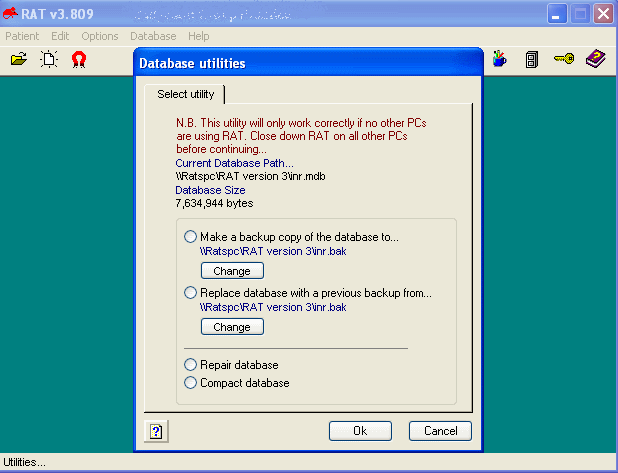
| How do I make a copy
of the database? |
| |
|
|

|
This icon will show this
screen. |
You will see a list of options to make a backup
copy of the INR.MDB database, restore from a previous backup, repair or
compact the database. It is best to frequently make a copy of the database
and copy it on a memory stick and store in a safe.
|
|
|
|
|
Here is part of the output from the PCT
Report.
You will see it is mostly figures. I decided
not to produce lots of graphs. I will leave that to you. There is lots of
raw data to allow for an varied amount of graphical representations.
|
|
|
|
|
|
|
|
|
|
YOU CAN BROWSE THE RAT MODIFICATIONS BELOW:.
18/05/11 v3.810
Database form modal, new installation program. New website.
13/10/09 v3.807
Increased font of standard printout
25/6/2009 v3.805
RAT prevented weekly doses of warfarin to be entered above 126mg/week
in new patients - fixed
27/4/2009 v3.804
Scribble pad contents made permanent.
Changed 'List all Patients' to include patients on warfarin for date ranges.
18/2/2009 v3.803
Added archive date to archived patients comment field in the 'Indications' tab
Made the label printout narrower
Antiphospholipid range 2-3 in INR database
Patients attending quarterly broken into each site for QOF payment purposes
22/4/2008 v3.801
Tidied up a few bugs in the new backup/restore routine.
Restoring up from floppy was not working.
12/4/2008 v3.8
Changed screen for backing up RAT to allow transfer to media other than floppy.
Added 'Monitor weekly' check button for patients who may be just out of hospital
or on chemotherapy.
Logic changed to review early when INR within range when previous INRs were low.
Also added translations for New Zealand into 4 languages for printouts.
21/2/05 v3.705
Logic changed.
When INR is high end of normal or above and previous INR
low, calculation adjusted to reduce warfarin dose even when
within range.
24/1/05 v.3.704
Password protection added.
Tweaked review dates for patients attending on Mondays.
Previously RAT was bringing patients back 1 week early
Prevent extension of review date if patient attends too
early for INR test.
Released PDF file for download detailing recent updates.
17/1/05 v.3.703
If RAT user chose a reference range or treatment length different that recommended
RAT would have defaulted back to setup references if user edited the 'Indication'
screen. in v3.703 this does not now happen.
20/9/03 v3.70
Option to print 2 dose recommendations
Option to print to A5 paper
Print out one patients details to send to new practice
warning re backups
20/1/03 v3.693
For a patient in the 3-4 range, If a previous INR was below and the current
is at the upper end of the range, RAT now reviews in 2w rather than 4w.
(Thanks Dr Arnold McDowell, GP Newry Co Down)
1/5/02 v3.692
On modifying recommendations, deleting doses and leaving only a blank box or
just a dot causes error when trying to reload patient details.
FIXED
(Thanks Dr Harris, Oldcastle Surgery)
Width of printout for weekly doses widened.
Some printouts were hiding some digits
Thanks to Dr Maura Charlton
14/3/02 v.3.691
Error with PCG Audit:
'Patients registered in last quarter' undercounted archived patients - FIXED
'Poor compliance icon' caused fault if clicked - FIXED
12/2/02  v3.69
Error with OBRI index, some patients had erroneous values - FIXED
18/01/02 v3.68
1. Added new option to audit list:
To report number of patients who attended in last quarter
per doctor.
15/01/02 v3.66
1. Printing review list was not printing patients who had been unarchived.
2. Patient on .5 dose increments were causing an error if dose was
unchanged.
13/01/02 v3.65
When adding a patient, using 'continue with this patient'
causes an error displaying a different patient -> FIXED
11/01/02 v3.6.4
1.When adding new patient, if most recent INR has no review period,
the patient details are not saved properly and not accessible.
2. Stopped allowing historical INRs being entered without review period.
12/12/01 v3.6.2
I believe I have solved the error when modifying previous INR results.
Prevented one than one user editing previous INRs at same time.
|
 |
|
|
Please note RAT
should only be used by health professionals familiar with
warfarin management |
|
Copyright 1996-2013 formulae software |
|

|
|
|
|
|
|
|
